Software
Honest review of Defiq Inspect — the defect report tool I wish I had on the first vacant possession
A working inspector’s review of Defiq Inspect for Singapore and Malaysia: on-site capture, sticky room tagging, and a client PDF the same evening — instead of a Word document built from a WhatsApp album.

- defiq-inspect
- property-inspection
- defect-report
- singapore
- malaysia
- qlassic
- conquas
- handover
I have spent too many nights after a vacant-possession walk, sitting with a laptop, a WhatsApp album, and a Word file that still has no cover page. The unit was finished at 4pm. The report was not finished at midnight.
That is the job Defiq Inspect is built for. It is property defect inspection software for Malaysia and Singapore: phone capture on site, report assembly in the office, and a handover PDF the buyer can actually read. After going through the product — the field app, the web office at app.defiq.app, and the pricing on defiq.app — I would put it in front of any inspector who still assembles reports by hand. Solo operators, VP agencies, renovation firms, and interior designers who have to issue a defect list. The time you get back is the evening.

Quick take
Defiq Inspect replaces the loop most of us still run: shoot everything, dump it into a chat, rename files, paste into Word, then write the legend from memory. The published baseline on their own site is honest about that loop — 2–4 hours per unit in Word. I recognise that number. A three-bedroom with a careful eye is easily two hundred photos. Sorting them is the work. Inspecting was the easy part.
The app keeps you at inspection pace. You pick the room once. You pick the surface once. Every photo after that inherits both, gets a defect code (A01, A02, and on), and sits in a queue that uploads when the basement carpark finally has signal. Back at the desk you reorder pages, fill legends, and export. You are assembling a report, not reconstructing the afternoon.
Where the hours actually go
People assume inspection software slows the walk. Buyers are waiting, the developer’s rep is watching the clock, and nobody wants an inspector tapping through menus in the master bathroom.
Defiq is tuned the other way. The room stays selected until you change it. The element — floor, wall, ceiling — stays selected inside that room. The issues you use most sit in a short panel, and you can repeat the last issue instead of hunting the list again. Annotation is there when a circle or an arrow earns its place. It is not a gate you must pass before the next photo. Save, or save and shoot the next one.
That is the whole speed trick. Minimum input while you are standing up. The structured record is a side effect of the photo, not a form you fill in later.
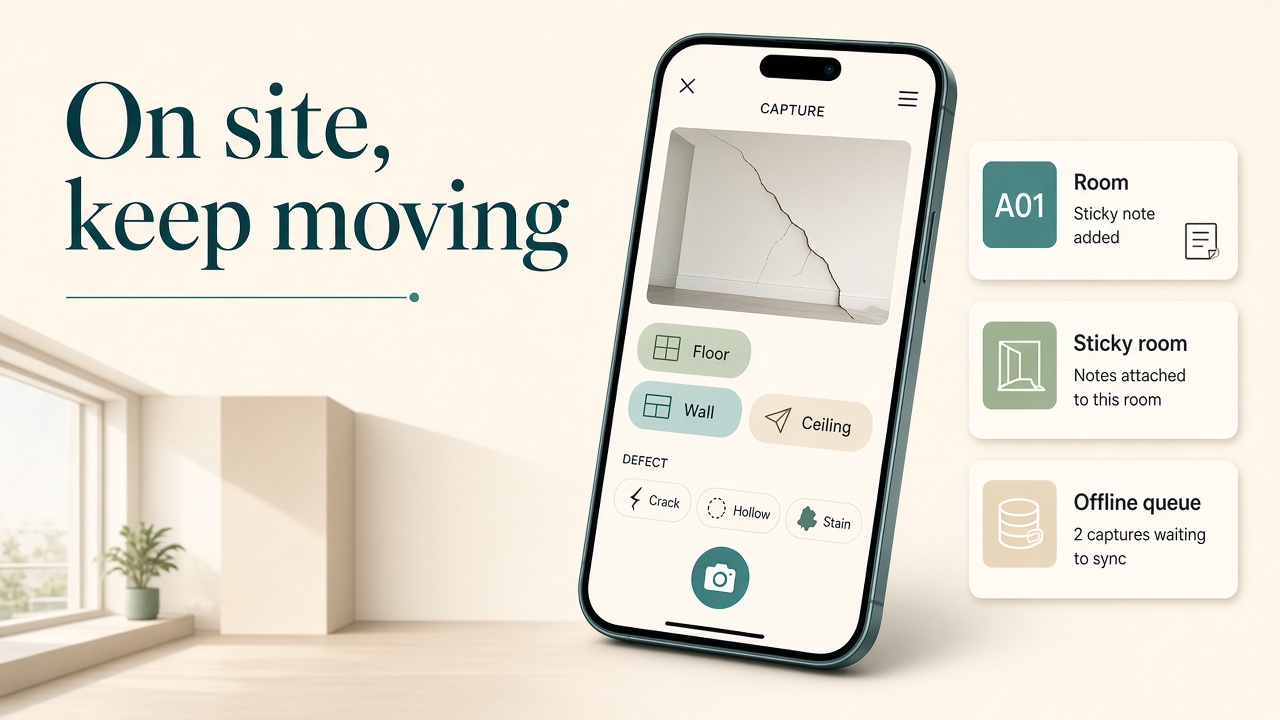
Offline matters more than the marketing line suggests. Condo basements, M&E rooms, and half-finished Malaysian landed houses drop signal. Photos stay on the phone and upload when you are back online. The PDF waits until those uploads finish, which is the correct trade. I would rather wait ten minutes for complete evidence than send a client a report with grey boxes.
The evening you used to lose
Here is the comparison I keep in my head, using the 2–4 hour figure Defiq publishes for the manual method.
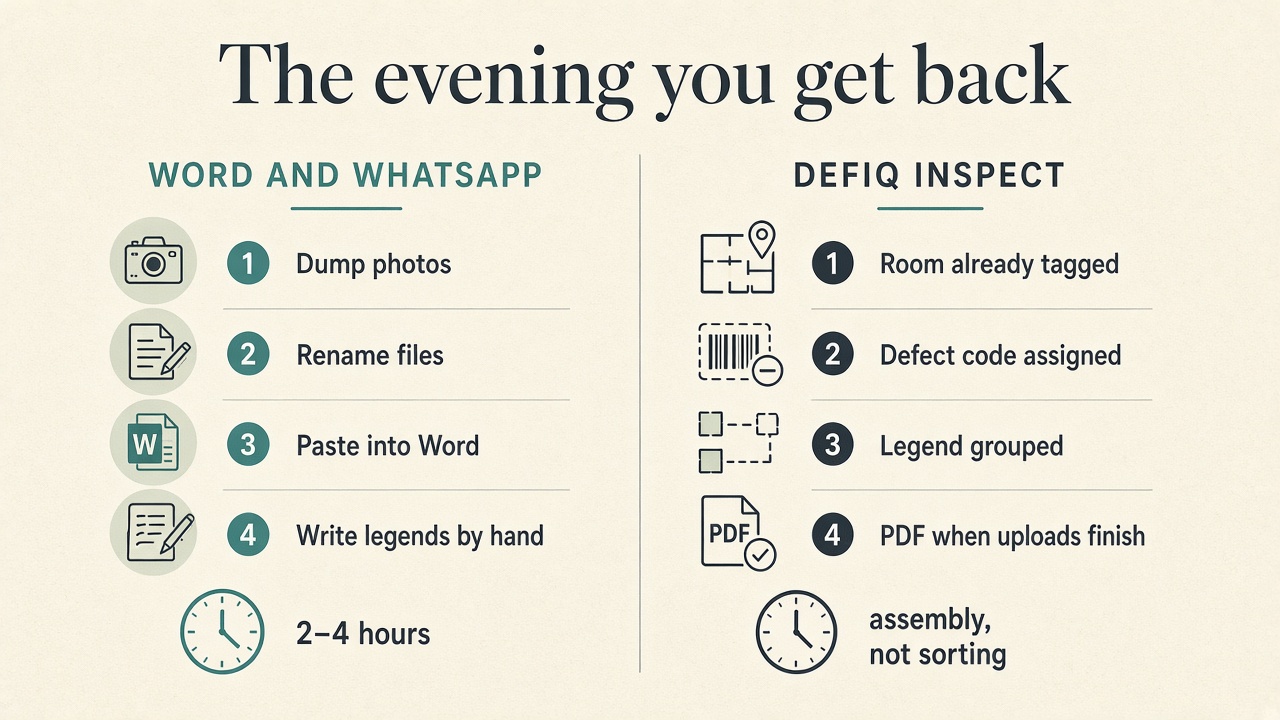
| After you leave the unit | Word and WhatsApp | Defiq Inspect |
|---|---|---|
| Photos | One album, no rooms | Already filed by area |
| Naming | Rename by hand | Codes assigned as you shoot (A01, A02…) |
| Defect type | Remembered later, or lost | Tagged on the photo |
| Legend | Typed from scratch | Grouped from tags; you edit, you do not invent |
| Handover file | A document you hope looks professional | Cover, contents, photo grid, legend, disclaimer |
| Clock | 2–4 hours of sorting | Time spent on wording and page order |
Legend editing is the part I trust. Each photo can carry a placeholder from capture. You tap to write the description the client will read. Long-press can merge a range when five photos are the same crack continuing along a wall. Generate stays locked until every description is filled. That sounds strict. It is the difference between a report a buyer argues with and a report a buyer files.
Page order is draggable. Area pages sit next to unit-level pages: socket and spirit level, water ponding, remarks, disclaimer and certification. For a Malaysia project, the socket section can include the local socket-tester reference. Singapore and Malaysia are not a translated afterthought. Currency follows the region — SGD 99 / MYR 299 on Starter — and the report structure lines up with QLASSIC and CONQUAS, which is what assessors and handover clients on both sides of the Causeway already expect to see.
What the client actually receives
A buyer does not care that you used an app. They care that the crack in bedroom 2 is photographed, coded, described, and sitting in a document with their unit on the cover.

Evidence quality scales with the plan, and this is one of the few pricing pages I have seen that states pixel sizes instead of “HD”.
- Starter — 2400px photos, Defiq’s built-in handover template, 60 units a month, one seat.
- Professional — choose 2400px or 4000px, custom cover and company branding, DOCX as well as PDF, web admin, up to 10 seats, unlimited units.
- Business — always 4000px at high JPEG quality, client logo and colours inside the app, no Defiq footer on the PDF, letterhead on each page, unlimited seats.
Hairline cracks are why the higher resolution exists. A thumbnail that looks fine on a phone becomes an argument when the developer zooms the PDF. Business keeps that file at 4000px. Professional can choose it. Starter at 2400px is already far above a WhatsApp forward.
There is also a developer submission export, separate from the full handover report: a capped set of photos, spread across areas, named so a portal can take them. If you do both the buyer report and the developer pack, you stop exporting the same album twice by hand.
Admin portal, for the week you are not alone
Solo work fits Starter. The moment a second person walks a tower with you, the web office is the product.
Professional and above open an admin portal on app.defiq.app. The admin sets the report template, section templates, and the company profile before anyone goes to site. Inspectors are invited by Gmail. There is a report-maker role for the person who writes legends and does not need the camera. On site, people can claim areas so two inspectors do not photograph the same kitchen.
Business goes further: your logo and theme show after login, and the tag library — elements, issue types, the phrases your firm actually uses — is yours to edit. The phone icon stays Defiq. The report the client sees does not have to.
I would not buy Professional for a one-person practice. I would not stay on Starter once a coordinator is assembling reports while I am still in the next stack. The split is clear, and the free paths let you test it: 3 units a month with no card, or Starter’s first month free at 60 units.
Who should use it
Use it if you inspect in Singapore or Malaysia and the deliverable is a structured defect PDF.
- Independent inspectors who want agency-looking output before they have an agency.
- VP and handover teams who cannot spend the night on one unit when the next block keys are tomorrow.
- Renovation and commercial firms that need the same format every job.
- Interior designers who are asked to “just do the defects” and should not be learning Word styles at 11pm.
Price the inspection for the report, not for the fact that Word is free. Defiq’s own guidance says not to sit at RM299 a unit when established agencies charge RM699 or more for this kind of handover file. Starter at MYR 299 a month is one report fee. After that, the month is margin you used to spend on formatting.
What I would still watch
English is the inspector interface and the PDF boilerplate for now. Your own legend text can say whatever the buyer needs. Do not expect a full Malay or Chinese app chrome yet. Invoices and quotations are described for higher tiers and are not the reason I would subscribe today; the reason is capture-to-PDF. iPhone users start the free trial from the website, then sign in — Apple’s billing rules, not a missing product. PDF export needs the photos uploaded first. Plan the sync before you promise a file in the lobby.
None of that changes the recommendation. If your evening is still a photo dump, Defiq Inspect is the right tool. It gives the hours back to the next unit, which is the only place an inspector in this market actually makes money.
Support is human if you get stuck: support@defiq.app and +65 8137 8867. Pricing and the sample handover report sit on defiq.app.
Writer, Singapore
Comments
Leave a considered note. Comments are public.
No comments yet.